Felt Hot Pad Laser Cut Bundle Coasters: Elevate Your Kitchen with Precision Craft
The modern kitchen is a space where functionality meets aesthetics, yet finding tableware that satisfies both needs can be surprisingly difficult. Traditional pot holders often lack style, while decorative coasters frequently fail to provide adequate heat protection. This is where the Felt Hot Pad Laser Cut Bundle Coasters come into play, offering a sophisticated solution for DIY enthusiasts and crafters looking to create high-quality, custom kitchen accessories. By utilizing digital design files, you gain the freedom to produce items that are not only practical but also serve as unique pieces of art for your dining table.
Bridging the Gap Between Utility and Design
One of the primary challenges in home decor is balancing durability with visual appeal. Standard silicone mats or generic fabric trivets often clash with minimalist or abstract interior designs. Conversely, delicate ceramic or glass coasters cannot withstand the heat of a fresh coffee mug or a hot casserole dish. The Felt Hot Pad Laser Cut Bundle Coasters address this specific pain point by leveraging the natural properties of wool felt combined with precision laser cutting technology.
Wool felt is inherently heat resistant, making it an ideal material for protecting wooden tables from scorch marks and water rings. When paired with geometric or abstract floral patterns found in this bundle, the result is a set of trivets and coasters that look as good on display as they do in use. Whether you are hosting a dinner party or simply enjoying a morning brew, these items ensure your furniture remains pristine while adding a touch of modern elegance to your space.
Understanding the Digital Bundle
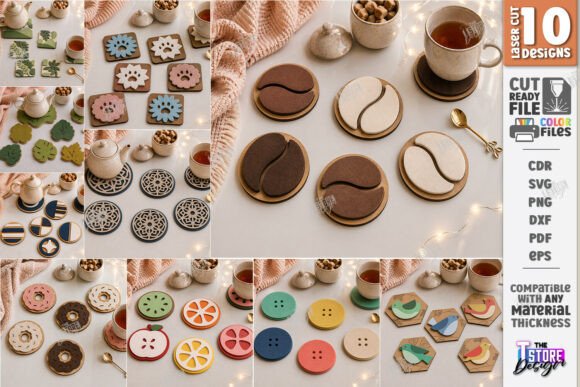
This product is not a physical item you receive in the mail; rather, it is a comprehensive digital toolkit designed for creators who own laser cutting equipment like Glowforge, Cricut, or Silhouette machines. The bundle includes a variety of file formats to ensure compatibility with different software ecosystems. You will receive 10 SVG files, 10 EPS files, 10 PNG files, 10 PDF files, and 10 DXF files. This versatility allows you to work within Adobe Illustrator, CorelDraw, LightBurn, or any other vector-based design software you prefer.
A crucial aspect of using these files is understanding the color-coded instructions embedded in the designs. In the provided vector art, red lines indicate cut paths, while black lines indicate engrave paths. This distinction is vital for achieving professional results. The red lines tell your machine exactly where to slice through the wool felt to create the shape of the coaster or trivet. The black lines guide the laser to etch intricate details, such as the abstract floral motifs or geometric borders, directly onto the surface of the felt without cutting all the way through. This dual-action process creates depth and texture, transforming a simple piece of fabric into a layered, dimensional ornament.
Practical Applications for Every Crafter
The applications for the Felt Hot Pad Laser Cut Bundle Geometric Trivet and Coaster files extend far beyond personal use. For the home crafter, this bundle offers a cost-effective way to customize your kitchen. Instead of purchasing expensive, mass-produced sets that may not match your color scheme, you can select wool felt in colors that perfectly complement your existing decor. The laser-ready nature of the files means you can go from computer screen to finished product in a matter of minutes, allowing for rapid prototyping and customization.
For small business owners and Etsy sellers, this bundle represents a significant opportunity to expand their product line. Handmade goods are in high demand, and kitchen accessories are perennial bestsellers. By utilizing these pre-designed vector art layouts, artisans can focus on production and quality control rather than spending hours designing patterns from scratch. The inclusion of multiple file formats ensures that regardless of the machinery your workshop uses, you can begin production immediately. Furthermore, the ability to offer custom sizes or slight variations based on customer requests adds a layer of exclusivity that drives sales.
Tailoring the Project to Your Needs
Different users will approach this project with varying levels of experience and goals. Beginners might start by using the included PNG files to print templates for manual cutting if they do not have access to a laser cutter, although the full potential of the design is unlocked with laser technology. Intermediate users can experiment with different types of wool felt, such as merino or synthetic blends, to test heat resistance and texture. Advanced crafters might combine multiple shapes from the bundle to create larger placemats or complex wall hangings, using the same geometric principles applied to the coasters.
It is important to consider the scale of your projects. While the bundle is optimized for standard coaster and trivet sizes, the vector nature of the SVG and DXF files means they are infinitely scalable. You can enlarge a coaster design to create a large serving mat or shrink a trivet pattern to make napkin rings. However, always remember to adjust your laser settings accordingly. Thicker felt requires slower speeds and lower power to prevent burning, while thinner materials may need faster cuts to maintain crisp edges.
Ensuring Success with Your Cutting Machine
Before diving into your first project, it is essential to verify that your cutting machine and software are compatible with the provided files. Most modern laser cutters handle SVG and DXF formats natively, but older systems might require conversion. If you encounter issues with the file types, the creator offers support for alternative formats. Do not hesitate to reach out via message if you need a specific file type or a different resolution for the PNG images. Customization is key to a smooth workflow, and having the right assets makes all the difference.
When setting up your machine, pay close attention to the "RED line – CUT" and "BLACK line – ENGRAVE" guidelines. Misinterpreting these lines can lead to wasted material or damaged equipment. Ensure your software is configured to recognize these color codes correctly. For instance, in LightBurn, you would assign the red layer to your cutting head and the black layer to your engraving settings. This separation allows for a clean, precise finish where the edges are sharp and the internal details are subtly textured.
Creating a Cohesive Dining Experience
Ultimately, the goal of using the Felt Hot Pad Laser Cut Bundle Coasters is to create a cohesive and stylish dining environment. These items protect your surfaces while acting as conversation starters. The minimalist kitchen coaster layouts fit seamlessly into contemporary homes, while the abstract floral patterns add a touch of organic warmth. Whether you are crafting a gift for a housewarming party or restocking your own pantry, these laser-cut felt crafts offer a perfect blend of utility and beauty.
As you explore the possibilities within this bundle, remember that creativity is limitless. You can mix and match patterns, experiment with layering different colors of felt, or even add leather accents for a more rugged look. The digital nature of the product means you can revisit these designs time and time again, creating new variations as your skills improve or your tastes evolve. Thank you for visiting the shop and considering these tools for your creative journey. Follow the store to stay updated on future releases, ensuring you never miss out on the latest trends in laser-ready wool felt placemat files and decorative table mat designs.