Elevate Your Craft Projects with the Laser Cut Royal Floral Corner SVG Bundle
For crafters, designers, and DIY enthusiasts, the Laser Cut Royal Floral Corner SVG Bundle offers an elegant way to add intricate, decorative accents to a wide range of laser-cut and layered paper projects. Whether you're creating personalized home décor, detailed invitations, or eye-catching signage, this SVG bundle brings a touch of sophistication and professionalism to your work. However, like any design tool, it's important to understand how to use it effectively to avoid common pitfalls that can impact your results.
What Is the Laser Cut Royal Floral Corner SVG Bundle?
The Laser Cut Royal Floral Corner SVG Bundle is a collection of scalable vector graphics featuring ornate floral corner designs. These files are ideal for laser cutting machines like Cricut and Glowforge, as well as CNC machines and layered paper crafting tools. The bundle includes multiple file formats—AI, EPS, SVG, DXF, and PNG—making it compatible with a wide range of design and cutting software.
Each design is crafted for easy customization, allowing users to resize, recolor, or combine elements without compromising quality. This flexibility makes it a popular choice for both beginners and experienced makers looking to enhance their projects with classic, royal-style aesthetics.
1. Underestimating Material Compatibility
One of the most frequent issues users encounter is assuming the SVG files will work perfectly with any material without adjustments. While the Laser Cut Royal Floral Corner SVG Bundle is designed for versatility, material thickness and type can affect how the design cuts or engraves. For example, using a design intended for thin paper on thick wood without adjusting the power settings can result in incomplete cuts or scorched edges.
Better approach: Always test your design on a scrap piece of your chosen material before committing to your final project. Adjust your machine settings accordingly, especially when working with materials like acrylic, MDF, or leather.
2. Ignoring File Format Differences
Many users download the Laser Cut Royal Floral Corner SVG Bundle without fully understanding the differences between the included file types. While SVG is ideal for vector editing and laser cutting, PNG files are raster images better suited for visual previews or printing rather than cutting.
Better approach: Use SVG or DXF files for laser or CNC cutting projects. If you're using software like Cricut Design Space or Adobe Illustrator, make sure you're importing the correct file format for your specific workflow.
3. Overlooking Design Layering and Spacing
Some users attempt to layer multiple elements from the Laser Cut Royal Floral Corner SVG Bundle without considering spacing and alignment. This can lead to overlapping cuts or designs that don't fit together as intended, especially in layered paper crafts or multi-layered wood projects.
Better approach: Use your design software to adjust spacing and alignment carefully. Group elements logically and test your layout digitally before cutting. This ensures a cleaner final product and reduces material waste.
4. Misjudging Design Complexity for the Project Scope
While the royal floral corners are beautiful, their intricate details may not be suitable for every project. Some users apply these designs to small or fast-turnaround items, only to find that the fine details are difficult to cut cleanly or are lost in the final product.
Better approach: Match the complexity of the design to the scale and purpose of your project. Larger home décor pieces or statement signs can showcase the details beautifully, while simpler, bolder designs may be better for smaller items like gift tags or place cards.
What to Check Before Downloading or Using the Laser Cut Royal Floral Corner SVG Bundle
Before you begin using the Laser Cut Royal Floral Corner SVG Bundle, take a few moments to verify the following:
- Compatibility: Ensure the file types included (AI, EPS, SVG, DXF, PNG) are supported by your design and cutting software.
- Scalability: Confirm that the design scales well without losing detail, especially if you plan to resize significantly.
- Layering Options: Look for designs that offer multiple layers or components if you're planning a layered craft project.
- License Terms: Check whether the bundle is for personal use, commercial use, or requires attribution. This is especially important for entrepreneurs or small businesses.
Maximizing the Value of the Laser Cut Royal Floral Corner SVG Bundle
To get the most out of the Laser Cut Royal Floral Corner SVG Bundle, consider these practical tips:
- Customize Thoughtfully: Don’t be afraid to tweak colors, sizes, or even combine elements from different designs to create something unique. Just ensure that any modifications maintain the structural integrity of the design for clean cutting.
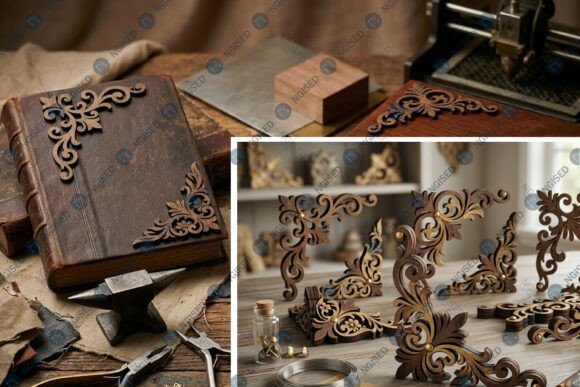
- Use Realistic Mockups: The preview images often show the designs in 3D mockups. While these are helpful, remember that your final product's appearance will depend on your material choice, lighting, and finish. Always create a physical sample if presentation is critical.
- Organize Your Files: Keep your SVG files well-organized by project or design type. This makes it easier to locate and reuse them later, especially if you're working on multiple projects.
- Learn from Community Feedback: Look for user reviews or tutorials that show how others have used the Laser Cut Royal Floral Corner SVG Bundle. This can offer valuable insights into best practices and creative applications.
Final Thoughts
The Laser Cut Royal Floral Corner SVG Bundle is a versatile and elegant design resource that can elevate your laser cutting and crafting projects. By understanding its capabilities and avoiding common missteps, you can ensure your creations look polished, professional, and perfectly executed. Whether you're a hobbyist, small business owner, or seasoned maker, taking a thoughtful approach to your design choices will help you make the most of this powerful tool.